
This WhatsApp setup guide for agency owners covers the full job in GoHighLevel. It explains the Meta accounts you need, the three ways to connect a number and the $10 monthly subscription per sub-account. It also covers Meta’s per-message pricing and how rebilling sets your margin. The connection itself is quick; billing and message design decide whether clients make money on WhatsApp.
WhatsApp works best for service businesses whose customers already reply there. This guide explains the setup in the order an agency should do it. It flags the October 2026 Meta pricing change and lists the mistakes that cause failed connections and surprise invoices.
What do you need before a GoHighLevel WhatsApp setup for a client?
Before you connect WhatsApp in GoHighLevel, the client needs a Facebook account tied to the business and a Meta business portfolio, or permission to create one. They also need a phone number they own that can receive an SMS or voice code, plus accurate legal business details. Meta business verification is optional to connect, but it raises limits.
- Facebook login for the business: HighLevel’s embedded signup asks you to log in with the Facebook account associated with the business. Then you select or create the business portfolio and WhatsApp Business Account.
- A number the business owns: it must include the country and area code and cannot be a short code. It must also receive an SMS or call for the one-time code.
- Number status: a number already active on the WhatsApp app must either be removed from it first or connected through Coexistence.
- Business details: use the legal name, website and address exactly as on official records, since Meta reviews the display name and verification against them.
- Payment method in HighLevel: the subscription is charged to the card on file and usage is drawn from the wallet. Check both before switching a client on.
WhatsApp setup at the agency level: how do you set pricing?
At the agency level, WhatsApp pricing is configured once in the Agency Dashboard under Reselling. There you set the default price clients pay and the usage multiplier. You can then override pricing for one client from the sub-account list under Manage Clients and Reselling. Do this before any client account is connected.
- Agency-wide default: Agency Dashboard, Reselling. Set whether you absorb or pass on the $10 monthly subscription and choose your markup.
- Per-client override: from the sub-account list, open the menu on the account, then Manage Clients and Reselling.
- Who pays usage: the agency may deploy WhatsApp directly without rebilling. Message charges then come out of the agency wallet, so you end up paying the client’s message bill.
- Cancelling: once a sub-account has bought WhatsApp, the agency cannot simply switch it off from the dashboard; HighLevel asks for a support ticket to cancel.
New to GoHighLevel? Try it free for 30 days
HighLevel's standard free trial is 14 days. Through our partner link you get 30 days plus HighLevel's free onboarding bootcamp. Rather have it built for you? Our US team sets up GoHighLevel accounts, websites, funnels and automations.
Partner link: we may earn a commission at no extra cost to you. Disclosure
Which WhatsApp setup path should you pick: Coexistence, new number or migration?
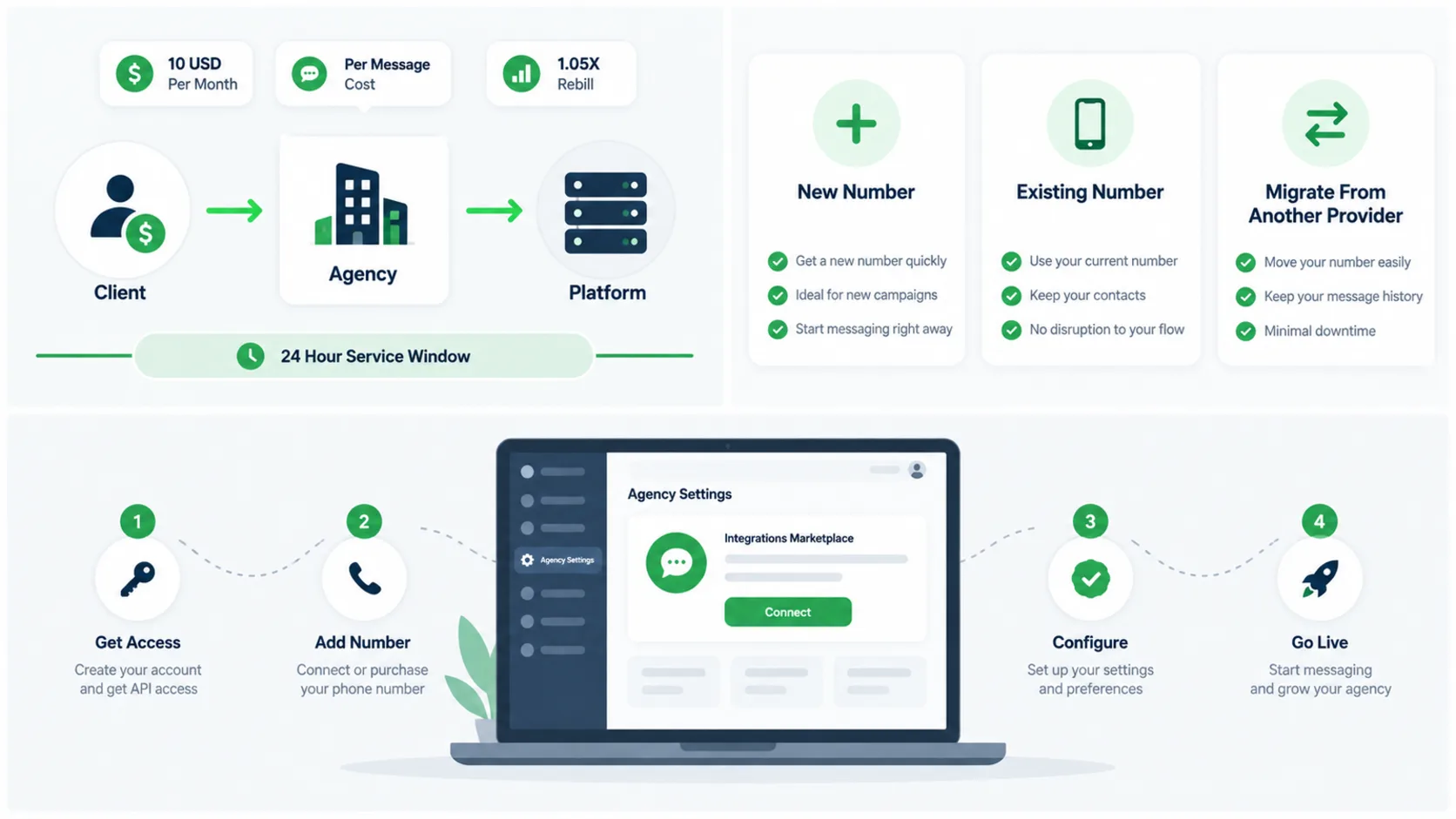
GoHighLevel offers three WhatsApp setup paths. Coexistence keeps a number the client already uses in the WhatsApp Business app and connects it to the CRM. A new number creates a fresh WhatsApp Business Account. Migration moves a number already on another provider’s Cloud API to HighLevel without creating a duplicate account.
| Path | Choose it when | Main limits |
|---|---|---|
| Coexistence | The client already runs the WhatsApp Business app and wants to keep it | One Coexistence number, templates sent only from the CRM, profile managed in the app |
| New number | A fresh number or a client new to WhatsApp | Starts at the lowest messaging limit until the portfolio earns more |
| Migration from another provider | The number is already on the WhatsApp Business Platform through another provider | Needs an approved display name; templates are recreated, not moved |
What should you know about WhatsApp Coexistence?
Coexistence lets the same number work in the WhatsApp Business app and in HighLevel at once. It imports up to six months of chat history and contacts, which must sync within 24 hours of connecting. Meta requires WhatsApp Business app version 2.24.17 or newer.
- Group chats, disappearing and view-once messages, live location, broadcast lists, calls and the catalog are not supported through the integration.
- Linked devices are disconnected during setup and need to be linked again.
- HighLevel currently lists numbers from Nigeria and South Africa as unsupported; check the current list before promising it to an international client.
What does migrating from another WhatsApp provider involve?
Migration uses Meta’s embedded signup: choose the business assets, enter the number and verify it with a one-time code. The number needs an approved display name with no pending change, and you may need the two-step verification PIN. Only approved templates with a good quality rating can be recreated in the new account, and only between accounts owned by the same Meta business.
How do you connect WhatsApp inside a client sub-account?
Inside a client sub-account, WhatsApp is connected under Settings, WhatsApp, using the Connect your WhatsApp option. You pick one of the three paths and log in through Meta’s embedded signup with the business’s Facebook account. Then you choose or create the business portfolio, add the number and confirm the code.
- Open the sub-account and go to Settings, then WhatsApp.
- Choose the path: Coexistence, a new number or migration.
- Log in with Meta using the business’s Facebook account and select the business portfolio.
- Add or select the number and verify it by SMS or voice call, or scan the QR code from the Business app for Coexistence.
- Complete the profile: photo, category, description, website and address.
For the profile photo and cover image specifications, see our guide to the WhatsApp cover photo size for GHL. If the sub-account itself is new, settle its business profile and time zone first; our GoHighLevel sub-account setup guide lists the day-one settings.
How does WhatsApp billing work in GoHighLevel?
WhatsApp billing in GoHighLevel has two parts: a $10 monthly subscription for each sub-account with WhatsApp enabled, and Meta’s message charges on top. Meta prices each delivered message by category and by the recipient’s country. HighLevel passes usage through the wallet, and agencies can add a markup through rebilling.
| Message category | Typical use | US/Canada rate in HighLevel’s table |
|---|---|---|
| Marketing | Offers, promotions, win-back campaigns | $0.0263 per message |
| Utility | Appointment reminders, order updates, receipts | $0.0036 per message |
| Authentication | One-time passcodes and login codes | Charged per message |
| Service | Free-form replies inside the 24-hour window | 1,000 free per number per month, then charged |
What changed in Meta’s WhatsApp pricing on October 1, 2026?
From October 1, 2026, Meta ended two free allowances that older guides still describe. Service messages are no longer free without limit. Each phone number gets 1,000 free service messages a month, with no rollover, and further ones are charged. Utility templates sent inside the 24-hour customer service window are now charged as well. Meta also changed rates in a number of markets the same day.
- The 24-hour window still matters: it opens or resets each time the customer messages or calls, and outside it only approved templates can be sent.
- Design for replies: conversations started by the customer keep more traffic inside the window and inside the free service allowance.
- Review client budgets: any client whose automations relied on free in-window utility messages now pays for each one.
How should you rebill clients for WhatsApp?
Rebilling WhatsApp in GoHighLevel works through a usage multiplier between 1x and 10x applied to Meta’s base rate. The default is 1.05x, which HighLevel sets to cover payment processing. In HighLevel’s own example, a $0.0263 marketing message at a 1.5x multiplier bills the client $0.0395.
- Keep the multiplier explainable: a client sending large marketing campaigns feels a high multiplier quickly.
- Set the subscription price separately: the $10 monthly fee and the usage markup are different levers.
- Watch wallet balances: if the wallet cannot cover usage, sends stop, and the client sees it as your failure.
- Recheck after Meta changes: Meta updates rates by market, so review margins whenever a new rate card takes effect.
You may want WhatsApp sold as part of a packaged plan rather than priced from scratch. Our service plans and pricing show how we bundle setup and ongoing support.
How do templates, messaging limits and quality ratings work?
WhatsApp templates are pre-approved messages in the marketing, utility or authentication category. You need one for any message sent outside the 24-hour window. Messaging limits cap how many unique customers a business portfolio can reach with templates in a rolling day. Quality ratings on numbers and templates decide whether limits rise or fall.
- Template review: Meta reviews templates automatically, which can take up to 24 hours, and status can change later based on quality.
- Template counts: an unverified business portfolio can hold 250 templates; a verified one with an approved display name can hold up to 6,000.
- Messaging tiers: limits now belong to the business portfolio and step from 250 to 2,000, 10,000, 100,000 and unlimited.
- Reaching 2,000: verify the business, or send 2,000 delivered templates outside the window to unique users within 30 days with good quality.
- Further increases: Meta raises the limit one level when quality is good. The business must also have used at least half its limit in the last 7 days.
- Numbers per portfolio: 2 at first, rising to 20 after verification or after reaching the 2,000 limit.
Templates and WhatsApp template assets can be included in a snapshot, so a tested template set can be reused across clients. Each new account still needs its own Meta approval. Our guide on how to create a snapshot in GoHighLevel explains how to package and update those assets.
Should clients use WhatsApp instead of SMS in the US?
For most US clients, WhatsApp works alongside SMS rather than replacing it. Many US customers still expect a text. SMS from a local number needs an approved A2P 10DLC campaign, while WhatsApp needs its own Meta setup and opt-in. Use WhatsApp where customers already message the business there.
- SMS: broad reach in the US, but carrier registration through The Campaign Registry comes first. We handle A2P 10DLC registration for a $50 flat service charge.
- WhatsApp: strong for international customers, communities and businesses whose clients already use it, with rich media and read receipts.
- Calls: calls started by the customer are free; business-initiated WhatsApp calling is not available for US and Canada numbers.
Connecting WhatsApp to outside tools, such as a booking system or a custom app, goes through webhooks and the HighLevel API. That is the work of our GoHighLevel API and integrations service.
What are the most common WhatsApp setup mistakes agencies make?
The most common WhatsApp setup mistakes are connecting with a personal Facebook profile and choosing a new number when the client wanted Coexistence. Skipping business verification and switching clients on before rebilling is set cause problems too. So do automations that rely on free messages Meta now charges for.
- Wrong Facebook login: the WhatsApp Business Account ends up under a staff member’s profile instead of the business.
- Wrong path: a client who wanted to keep the app loses it because the number was connected as new.
- No verification: the portfolio stays at the lowest limits and template counts.
- Billing set afterwards: the agency pays usage until rebilling is configured.
- Outdated cost assumptions: automations designed around free in-window utility messages now cost money.
- Weak display name: generic or keyword-stuffed names are declined; use the real trading name.
WhatsApp connected but messages failing?
WhatsApp may show as connected while templates are rejected, messages fail or clients are billed more than expected. The cause is usually in the account setup rather than the platform. Our GoHighLevel sub-account audit and rebuild reviews the connection, templates, billing settings and automations. Then we give a fixed quote to fix what is broken.
Frequently Asked Questions
Here are short answers to the questions agency owners ask most about a GoHighLevel WhatsApp setup. They cover cost, using the WhatsApp Business app on the same number, free service messages, business verification and migrating a number. All prices reflect HighLevel’s published tables and Meta’s October 2026 pricing change.
How much does WhatsApp cost in GoHighLevel?
HighLevel charges $10 per month for each sub-account with WhatsApp enabled. Meta’s message charges come on top, priced per delivered message by category and country. In HighLevel’s US and Canada table, a marketing message is $0.0263 and a utility message is $0.0036, before any agency markup set through rebilling.
Can I use the WhatsApp Business app and GoHighLevel on the same number?
Yes, through Coexistence. The number keeps working in the WhatsApp Business app while HighLevel sends and receives through the Cloud API. Up to six months of chat history is imported. Only one Coexistence number is allowed, and templates are sent from the CRM. Some features such as groups and broadcast lists are not supported.
Are WhatsApp service messages still free?
Not without limit. Since October 1, 2026, each phone number gets 1,000 free service messages per month, with no rollover, and further service messages are charged. Utility templates sent inside the 24-hour customer service window are also charged from that date. Older guides that call them free are out of date.
Do I need Meta business verification to use WhatsApp in GoHighLevel?
You can connect without it. An unverified business portfolio starts at the lowest messaging limit of 250, can hold only 250 templates and can register only 2 numbers. Verifying the business lifts it toward the 2,000 tier and allows up to 6,000 templates and up to 20 numbers.
How do I rebill WhatsApp usage to clients?
Set agency-wide pricing in the Agency Dashboard under Reselling, choosing a usage multiplier between 1x and 10x on top of Meta’s rate. The default is 1.05x to cover processing. You can override the rate for one client from the sub-account list under Manage Clients and Reselling.
Can I move a WhatsApp number from another provider to GoHighLevel?
Yes. HighLevel’s migration path uses Meta’s embedded signup to move a number from another provider without creating a duplicate account. The number needs an approved display name with no pending change, and you may need its two-step verification PIN. Templates are recreated rather than transferred, so only approved, good-quality templates carry over.