
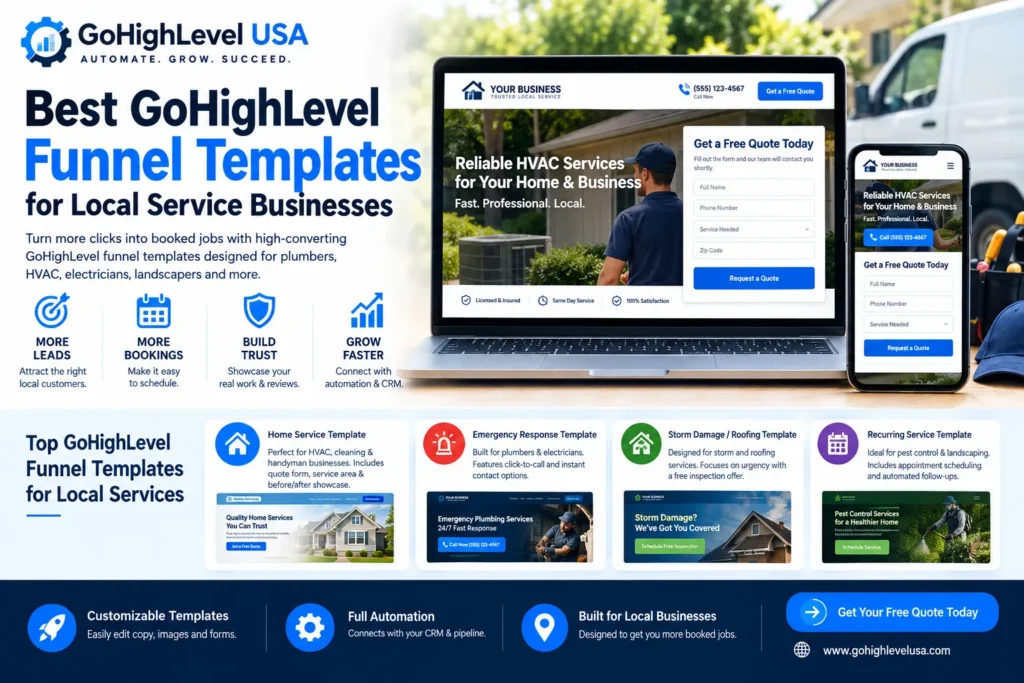
The best GoHighLevel funnel templates for local service businesses are short, mobile-first funnels built around one action: a call, a quote request or a booking. Pick the template by how your customers buy, whether that is an emergency, an inspection, a quote or recurring service. Then connect it to a pipeline and instant follow-up.
This guide covers the four template types that fit trades and home services and what makes a template local-service ready. It compares templates with snapshots and custom builds and lists what to change before launch. It also explains the compliance details that affect texting leads and the mistakes that make good templates underperform.
Why do local service businesses need a different funnel structure?
Local service businesses need a different funnel structure because their buyers decide fast and buy on trust. A homeowner with a leak or a broken AC wants a quick answer, a phone number and proof you serve their area. They do not want a long sales page built for coaches or online courses.
- Urgency: many searches happen on a phone, in the moment, so the call button and a short form matter more than long copy.
- Trust: licenses, insurance, reviews and real job photos do the persuading.
- Location: visitors need to see the towns or ZIP codes you cover in the first screen.
- Speed of reply: the business that answers first often wins the job, so the funnel must hand the lead to your team immediately.
What makes a GoHighLevel funnel template local-service ready?
A local-service-ready GoHighLevel funnel template has a click-to-call button above the fold and a form of three to five fields. It shows a clear service area, trust proof and a thank-you step that sets expectations. Anything that slows a mobile visitor down, such as long videos or extra pages, should go.
| Element | Why it matters | What to check |
|---|---|---|
| Click-to-call button | Urgent buyers prefer to call | Visible on mobile without scrolling |
| Short quote or booking form | Fewer fields, more submissions | Name, phone, service and ZIP are usually enough |
| Service area section | Confirms you cover their town | Real city names, no placeholders |
| Trust proof | Reduces risk for the buyer | Real reviews, license and insurance details, job photos |
| Thank-you step | Sets expectations after submit | Says what happens next and when |
| SMS consent wording | Required before you text leads | Optional checkbox with compliant language |
New to GoHighLevel? Try it free for 30 days
HighLevel's standard free trial is 14 days. Through our partner link you get 30 days plus HighLevel's free onboarding bootcamp. Rather have it built for you? Our US team sets up GoHighLevel accounts, websites, funnels and automations.
Partner link: we may earn a commission at no extra cost to you. Disclosure
What are the best GoHighLevel funnel templates by industry?
The best GoHighLevel funnel templates for local businesses fall into four types: home service quote, emergency response, inspection offer and recurring service. Each matches a different buying moment. Choose the one that fits how your customers call, compare and book, rather than the one with the nicest design.
Home service quote template
Best for HVAC, cleaning, painting and handyman businesses where buyers compare a few quotes. It pairs a short quote form with a service area section and a before-and-after gallery. Every submission should land in a pipeline as a new opportunity.
Emergency response template
Best for plumbers, electricians, locksmiths and restoration companies. Click-to-call sits front and center, the form is a backup, and missed calls need an instant reply. Our missed-call text-back service covers that gap when nobody can pick up.
Inspection or estimate offer template
Best for roofing, solar, foundation and pest inspections, where a free inspection or estimate is the main call to action. The booking calendar does the heavy lifting, so connect it to reminders that reduce no-shows. Regulated offers need extra care, as our guide to building a HighLevel mortgage funnel shows.
Recurring service template
Best for lawn care, pool service, cleaning plans and pest control. It sells a plan rather than a one-off job, so it needs clear plan options, online booking and review requests after each visit.
Each of these structures is worth testing inside your own account. If you do not have one yet, start with a 30-day free trial (partner link) instead of HighLevel’s standard 14 days.
Should you use a template, a snapshot or a custom build?
Use a funnel template when you need one page flow quickly. Use a snapshot when you want the funnel plus the pipeline, calendars, forms and automations already connected. Choose a custom build when you run several locations or an unusual sales process that no template matches.
| Option | What you get | Best for |
|---|---|---|
| Funnel template | Page design and steps only | A single offer, fast launch, DIY owners |
| Snapshot | Funnels plus pipelines, calendars, forms and automations in one import | Businesses that want a complete system per trade |
| Custom build | A funnel mapped to your exact process | Multi-location teams and complex sales cycles |
A template only gives you pages; the follow-up still has to be built and connected. Industry GoHighLevel snapshots include the funnel and the system behind it, so a new sub-account starts with everything wired together.
If you are moving from ClickFunnels, HighLevel’s help center documents importing ClickFunnels 1.0 and 2.0 funnel steps. Our GoHighLevel funnel vs ClickFunnels comparison explains what changes when you switch.
What should you customize beyond the template itself?
Beyond the template, customize the service area, offer, trust proof, photos, form fields and where each lead goes. A template with placeholder cities, stock photos and an unconnected form looks finished but books nothing. Treat it as a starting layout, not a finished sales system.
- Service area: list real towns and neighborhoods; vague areas hurt trust and local relevance.
- Offer: one clear offer per funnel, such as a free estimate or same-day service window you can honor.
- Proof: replace sample testimonials with real reviews and real job photos.
- Form to pipeline: each submission should create a contact and an opportunity in the right pipeline stage, with your team notified.
- Domain and tracking: publish on your own domain and confirm form submissions are tracked as conversions.
How should follow-up and texting compliance work?
Follow-up should start within minutes of a form submission, usually by text and email. Texting requires A2P 10DLC registration plus clear consent on the form. Without both, carriers can filter messages to new leads. The funnel’s best leads then go cold before anyone replies.
- A2P 10DLC: US carriers require brand and campaign registration through The Campaign Registry before you text from a local number with LC-Phone or another provider.
- Consent wording: add an optional SMS consent checkbox with compliant wording; our guide to SMS opt-in language has examples.
- Email authentication: set up DKIM, SPF and DMARC on your sending domain so confirmations and quotes reach the inbox.
- Reviews: after the job, a review request helps the next visitor trust your funnel.
If texting is not registered yet, our A2P 10DLC registration service handles the brand and campaign for a $50 flat service charge plus carrier fees.
What are common mistakes with pre-built funnel templates?
The most common mistakes with pre-built funnel templates are leaving placeholder content, slow mobile pages and forms that are not connected to a pipeline. Missing instant follow-up and texting leads before A2P approval are just as costly. Each one quietly lowers bookings even when the ads and the design are good.
- Stock images instead of real job photos and team pictures.
- Large images and embedded videos that slow the page on mobile data.
- Too many form fields, or required fields the team never uses.
- No thank-you step, so leads do not know when you will call.
- Duplicate or broken automations after importing several templates into the same sub-account.
Pricing is another surprise: templates themselves are often free, but the build, the domain and the follow-up are not. Our breakdown of GoHighLevel funnel cost explains what you pay.
How do you improve a funnel after launch?
Improve a funnel after launch by testing one change at a time, such as the headline, the offer, the number of form fields or the call-to-action wording. Judge each change on booked jobs rather than clicks. Funnels improve through small, measured changes, not full redesigns every month.
- Track form submissions, calls and booked appointments per funnel.
- Use split tests on funnel steps when you have enough traffic to compare.
- Review which pipeline stage leads stall in, and fix the follow-up there.
Imported a template and it is not booking jobs?
A template that looks right but books nothing usually has a broken connection behind it. Forms may not reach the pipeline, automations may fire twice or texts may be blocked by an unregistered number. Our GoHighLevel sub-account audit and rebuild finds what is broken and gives you a fixed quote to fix it.
Prefer a monthly done-with-you or done-for-you plan instead? See our GoHighLevel service plans and pricing.
If you are looking at third-party template stores, see our FG Funnels review with price, pros and cons.
Frequently Asked Questions
Here are short answers to the questions local service owners ask most about GoHighLevel funnel templates. They cover the best template for home services, editing after import, calendars versus forms, cost and texting compliance. Use them with the template types above to pick a layout that fits how your customers buy.
What is the best GoHighLevel funnel template for a home service business?
For most home service businesses the best GoHighLevel funnel template is a short quote funnel. It has a click-to-call button, a three to five field form, a service area section and real job photos. Emergency trades should lead with the call button. Inspection-based trades such as roofing should lead with a booking calendar.
Can I customize a GoHighLevel funnel template after importing it?
Yes. A GoHighLevel funnel template stays fully editable after import, so you can change copy, images, form fields, colors and steps at any time. Replace placeholder cities, sample reviews and stock images before launch. Connect each form to the right pipeline so every submission becomes an opportunity your team can follow up.
Do local service funnels need a booking calendar or just a form?
It depends on how customers buy. Inspection and recurring services usually benefit from a booking calendar with reminders, because the visitor can pick a time immediately. Emergency services usually do better with a call button and a short form. The customer wants to talk now rather than schedule a visit for later.
What is the difference between a funnel template and a snapshot?
A funnel template gives you page designs and steps only. A snapshot imports a whole setup into a sub-account, including funnels, pipelines, calendars, forms and automations, so the follow-up is already connected. Use a template for a single quick page flow and a snapshot when you want a complete system for your trade.
Do I need A2P 10DLC registration to text leads from my funnel?
Yes, if you text US leads from a local 10-digit number. Carriers require a registered brand and campaign through The Campaign Registry, and your form should include an optional SMS consent checkbox with compliant wording. Unregistered traffic can be filtered or blocked, so register before launching a funnel that relies on text follow-up.
Should emergency and recurring service businesses use different templates?
Yes. Emergency businesses need instant contact, so the call button and missed-call follow-up come first. Recurring service businesses sell plans, so they need plan options, online booking, reminders and review requests after each visit. Using one template for both usually means the urgent buyer waits and the plan buyer gets too little detail.