
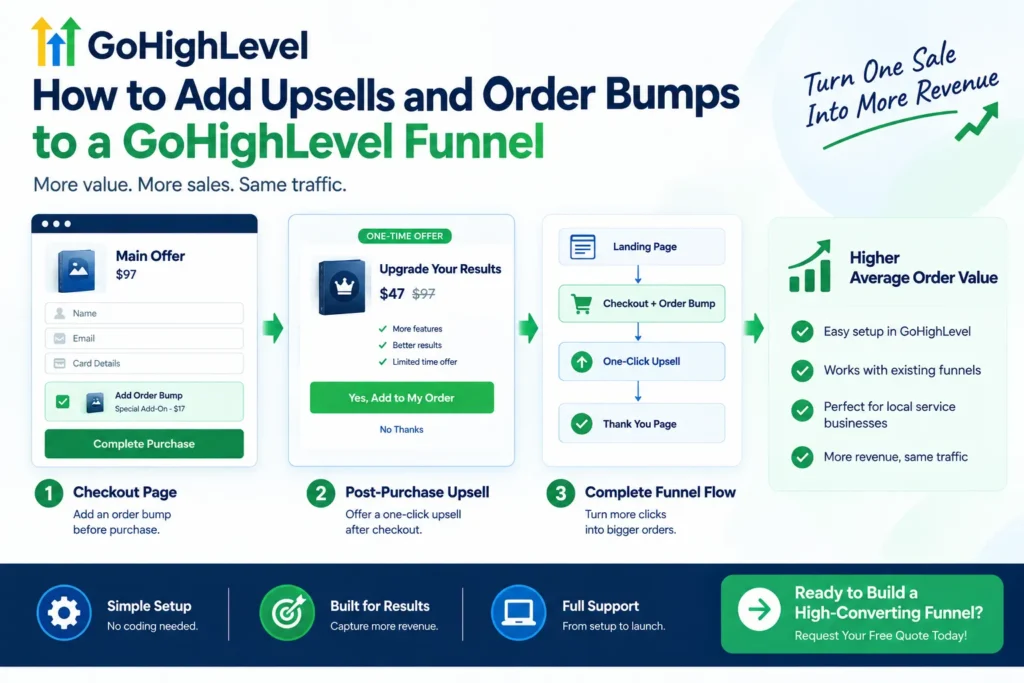
Why do two businesses with the same traffic and offer earn different revenue per sale? The answer often comes down to GoHighLevel Upsells and Order Bumps. Traffic alone doesn’t decide how much a customer spends with you. Two simple features, placed correctly, can turn one small sale into a much larger one. Most businesses focus entirely on getting more visitors, while ignoring what happens after checkout. A well-placed upsell or bump captures revenue that’s already sitting right in front of you. At GoHighLevel USA, we build these features directly into every funnel we create. This guide breaks down exactly how to set both up, and why they matter.
What’s the Difference Between an Upsell and an Order Bump?
These two terms get confused often, even though they work differently. An order bump appears directly on the checkout page, before the purchase completes. It’s a small, related product added with a single click during checkout. A post-purchase upsell appears after the first purchase finishes, using stored payment details. Both live inside the same upsell funnel, just at different moments in the customer’s journey.
Why Upsells and Order Bumps Matter for Revenue
These features increase average order value without needing a single extra visitor. A customer already committed to buying is far more open to a small additional yes. This moment, right after a decision, is when people feel least resistant to spending more. GoHighLevel Upsells and Order Bumps work because they meet customers at their most receptive point. Ignoring this stage means leaving real revenue on the table every single day.
Setting Up an Order Bump in GoHighLevel
Getting an order bump live inside your funnel takes just a few clear steps. This process fits naturally into any existing checkout page you’ve already built.
- Create the bump as a product first, and mark it as a Bump Product
- Add a two-step order form to your funnel page
- Toggle on the Order Bump option under Advanced settings
- Preview the page to confirm it displays correctly before launch
Setting Up a One-Click Upsell in GoHighLevel
A one-click upsell requires the customer’s payment details from the first purchase. This step must come directly after a properly configured two-step order form. Inside the funnel builder, edit the step where the upsell should appear. Connect your upsell product with its own name, price, and description. Test the full flow yourself, since one-click upsells only work with supported card processors, not PayPal.
Order Bump vs. Upsell: Which Should You Use First?
Both features work well together, but they serve slightly different purposes. Order bumps perform best with low-cost, clearly related add-ons shown during checkout. Upsells work better for higher-ticket offers presented right after the main purchase completes. Most high-converting gohighlevel sales funnel pages use both together, not just one alone. Starting with a bump, then adding an upsell, is a smart, low-risk sequence.
Pricing Your Bumps and Upsells for Maximum Acceptance
Pricing plays a bigger role in acceptance than most people expect. A bump priced far below the main offer feels like an obvious, easy yes. Upsells can sit higher in price, especially when the value connects clearly to the first purchase. The goal is removing hesitation, not creating a second, harder buying decision. Simple, clear pricing almost always outperforms anything that feels complicated or forced.
Common Mistakes That Hurt Upsell and Bump Performance
Even a well-built gohighlevel funnel can underperform with a few small mistakes. Pricing the upsell too close to the main offer often triggers hesitation. A bump description that’s unclear or easy to miss won’t get noticed at all. Skipping a full checkout test before launch can leave broken steps unnoticed. It’s also worth remembering that PayPal-only checkouts can’t support one-click upsells at all.
How This Fits Into a Full Funnel Strategy
Upsells and bumps work best as an addition, not a fix for a weak offer. Gohighlevel Funnel optimization should start with a strong core offer and solid conversion rate first. Once that foundation works, layering in bumps and upsells increases revenue further. This mindset keeps expectations realistic and results genuinely sustainable over time. A great gohighlevel funnel design makes room for this kind of layered growth naturally.
How GoHighLevel USA Builds Funnels With Upsells Built In
At GoHighLevel USA, we don’t treat upsells as an afterthought added later. Every ghl funnel we build considers the full customer journey, from first click to final upsell. This means checkout pages, bumps, and upsells all work together from day one. Our team tests each step before launch, so nothing breaks in front of a real buyer. This approach helps businesses across the country capture more revenue from the traffic they already have.
Final Thoughts
GoHighLevel Upsells and Order Bumps are simple tools with a genuinely significant revenue impact. They don’t require more traffic, more ad spend, or a bigger marketing budget. They simply capture value that’s already available inside your existing checkout process. Setting both up correctly takes careful testing, clear pricing, and thoughtful placement. GoHighLevel USA helps businesses build funnels where every step, including checkout, works to increase revenue.
Frequently Asked Questions
1. What’s the difference between an order bump and an upsell?
An order bump appears during checkout, while an upsell appears as a separate offer right after purchase.
2. Can I add more than one upsell to a GoHighLevel funnel?
Yes. Multiple upsell steps can be added in sequence after the initial purchase.
3. Do order bumps work with PayPal payments?
No. One-click upsells and some bump configurations require supported card processors instead of PayPal.
4. How much should I price an order bump?
Bumps generally work best priced well below the main offer, making the decision feel easy.
5. Can upsells be added to an existing, already-live funnel?
Yes. Upsell and bump steps can be added to a funnel that’s already live and running.
Ready to Turn One Sale Into More Revenue?
Stop leaving revenue on the table after checkout. Talk to our experts at GoHighLevel USA and request your free quote today.