
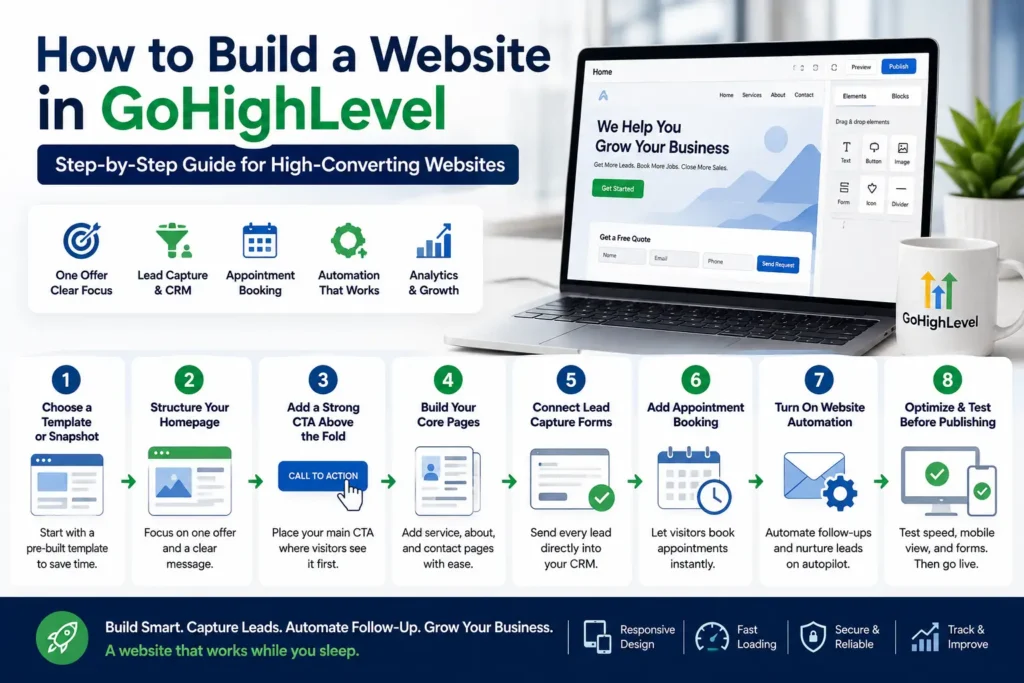
Why do some websites bring in leads every single day while others just sit there? The answer usually comes down to how to build a website in GoHighLevel from the start. A pretty design means nothing if visitors never turn into customers. This guide walks you through the exact process, step by step, with no coding required. By the end, you will know how to launch a GoHighLevel website built to generate real leads.
What Makes a Website “High-Converting”
Quick answer: A high-converting website turns visitors into leads through a clear offer, fast loading, and strong calls-to-action. Design matters, but conversion structure matters more. A few core elements drive real website conversion rate improvements. Clear headlines, visible call-to-action buttons, and simple website navigation all play a role. Without these basics, even a beautiful site struggles to perform. This is why a conversion-focused website always starts with strategy, not decoration.
What You Need Before You Start
Getting ready before you build saves time and prevents rework later. Here is a simple beginner checklist to gather first:
- A GoHighLevel account or sub-account
- Your logo, brand colors, and basic business info
- One clear offer you want visitors to take action on
- A niche-relevant snapshot, if you want a faster starting point
Having these ready makes the build process much smoother.
Why “High-Converting” Matters More Than “High-Traffic”
Many beginners chase traffic first and conversions second. That order usually leads to wasted ad spend and disappointing results. A smaller, well-targeted audience often outperforms a large, unfocused one. Someone lands on your page already interested in your service. If the page is slow, confusing, or missing a clear next step, that interest disappears fast. This is exactly why conversion structure should come before design polish. Colors and fonts matter, but they matter far less than clarity. A conversion-focused website guides visitors toward one action, every single time.
Mobile Experience and Page Speed Matter More Than Ever
Most visitors today browse from a phone, not a desktop. That gap quietly costs businesses leads every single day. Testing your responsive website design across devices should never be optional. Slow-loading pages also push visitors away before they even see your offer.
A few quick checks help here:
- Load your homepage on a phone and time it
- Tap every button to confirm it works correctly
- Shrink and resize the browser window to spot layout issues
These small checks prevent big, avoidable conversion losses later.
Step-by-Step: How to Build a Website in GoHighLevel
Now let’s walk through the actual GoHighLevel website builder process from start to finish. Follow these steps for the best results.
- Step 1: Choose a template or snapshot. Start with a pre-built template or niche snapshot instead of a blank page. This saves hours and gives you a proven starting structure.
- Step 2: Structure your homepage around one offer. Avoid cramming multiple offers onto a single page. One clear message converts far better than five competing ones.
- Step 3: Add a strong above-the-fold call-to-action. Your main call-to-action should appear before visitors scroll. This is often the single biggest driver of a lead generation website.
- Step 4: Build your core pages. Add clear service, about, and contact pages. Keep the user experience simple and easy to follow throughout.
- Step 5: Connect lead capture forms: Set up website forms and lead capture forms tied directly to your CRM. Every submission should flow straight into your pipeline.
- Step 6: Add appointment booking. If your business takes bookings, enable appointment booking directly on key pages. This removes friction between interest and action.
- Step 7: Turn on website automation. Use website automation and marketing automation to follow up instantly. Fast follow-up dramatically improves lead quality and response rates.
- Step 8: Optimize and test before publishing. Check responsive website design, page speed, and every form before going live. A final test run prevents costly mistakes after launch.
A quick pre-launch checklist
- Confirm every form connects to your CRM correctly
- Test the site on both mobile and desktop
- Click every button and link at least once
- Check that automation triggers fire as expected
Beginner Mistakes That Kill Conversions
Even a well-designed site can underperform because of small, avoidable errors. Watch out for these common beginner mistakes:
- Adding too many competing calls-to-action
- Slow-loading pages that frustrate visitors
- Skipping mobile-friendly website testing before launch
- Forms that don’t connect properly to automation
- Vague headlines that don’t state a clear benefit
Fixing these issues early protects your website optimization efforts long-term.
High-Converting Website Best Practices
A few consistent habits separate high-performing sites from average ones. These practices apply across almost every industry and business size.
- Write benefit-driven headlines instead of generic ones
- Place testimonials near your main call-to-action
- Keep one primary goal per page
- Show trust badges, reviews, or certifications clearly
- Make contact info and location visible above the fold
Following these steps supports stronger conversion optimization across your entire site.
Why GoHighLevel USA Builds Sites This Way
At GoHighLevel USA, every site we build starts with conversion strategy first. Our team focuses on CRM integration, clean sales funnel structure, and proper lead nurturing from day one. We also build with a strong local SEO foundation for service-based businesses. Home services, dental, real estate, and med spa clients all need fast, mobile-ready pages. Our process typically delivers a working, tested site within one to two weeks. Businesses that want to skip the DIY process can have our team build a website in GoHighLevel for them. We handle setup, automation, and website analytics tracking from the start. That means you launch with a system already built to convert.
Frequently Asked Questions
Do I need coding skills to build a website in GoHighLevel?
No coding is required at any step of the process. The builder uses a simple drag-and-drop editor anyone can learn.
How long does it take to build a GoHighLevel website?
A basic site can go live in a few hours using a template. A fully customized, tested build usually takes a few days.
Can I use a snapshot to speed up my website build?
Yes, a snapshot gives you a proven starting structure instantly. This saves significant time compared to building from a blank page.
What makes a GoHighLevel website different from a regular website?
A GoHighLevel website includes built-in CRM, automation, and lead tracking. Most other website builders require separate tools for these features.
How do I know if my website is actually converting?
Check your website analytics for form fills, calls, and booked appointments. A high-converting business website shows steady lead activity, not just traffic.
Ready to Launch a Website Built to Convert?
Learning to build a website in GoHighLevel is only half the equation. Strategy, automation, and testing are what actually turn visitors into paying customers. GoHighLevel USA builds every site with that outcome in mind from day one.
Request a free quote today and let our team build your high-converting website the right way.