
To log in to GoHighLevel, go to app.gohighlevel.com, enter your email and password, and click Sign In. If you’re using an agency or sub-account, ensure the correct credentials are used. You can also log in via the GoHighLevel mobile app on iOS and Android. Forgot your password? Use the “Forgot Password” link to reset it easily.
What Is GoHighLevel?
GoHighLevel (also known as HighLevel or Go High Level) is a powerful all-in-one platform for CRM, marketing automation, funnel building, and more. It’s especially popular among marketing agencies, freelancers, and small business owners looking for a unified system to manage clients, leads, and campaigns.
Whether you’re new to the platform or switching accounts, understanding how to properly log in is the first step to getting started. Let’s walk through the login process, types of logins, and how to fix common issues.
GoHighLevel Login Types
Before logging in, it helps to know which type of account you have:
- Agency Admin Login – For owners of agency accounts managing multiple sub-accounts.
- Sub-Account Login – For businesses or clients operating under an agency account.
- Mobile App Login – For users who want quick access on their smartphone or tablet.
How to Login to GoHighLevel (Web)
Follow these steps to log in via a web browser:
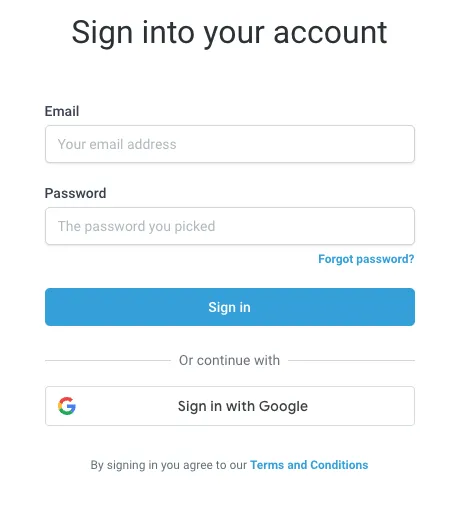
- Open your browser and go to https://app.gohighlevel.com
- Enter your email address and password
- Click Sign In
- If you manage multiple accounts, you’ll be asked to choose your agency or sub-account
- You’ll be directed to your dashboard
✅ Tip: Bookmark the login page for faster access in the future.
How to Login with the GoHighLevel Mobile App
Prefer accessing GHL on the go? Here’s how:
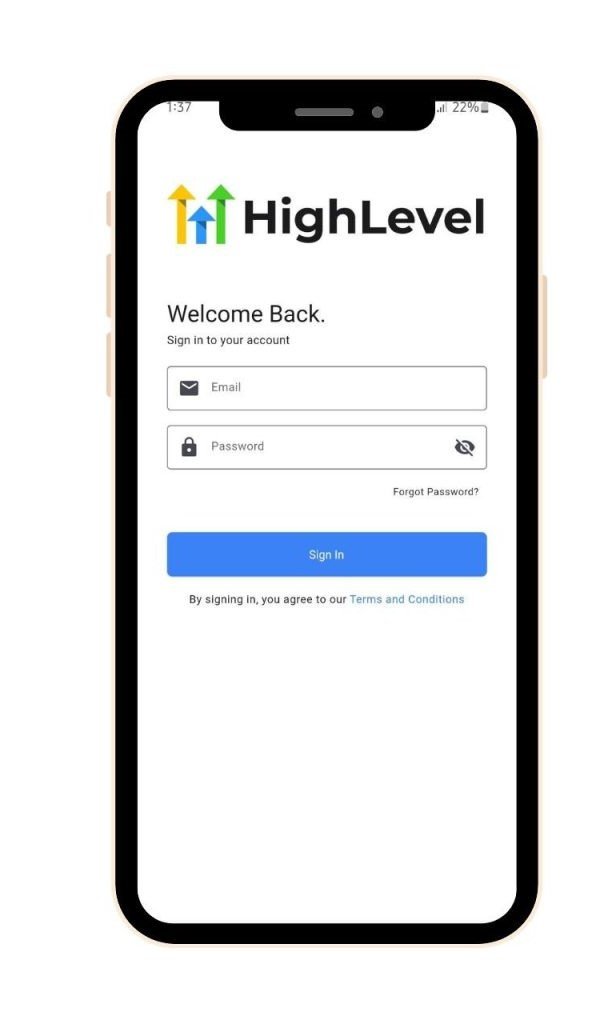
- Download the GoHighLevel App from the Apple App Store or Google Play Store
- Launch the app
- Enter your login credentials (same as web)
- Tap Sign In
- You’ll be taken to your mobile dashboard, where you can view chats, leads, funnels, and more
✅ Note: The mobile app syncs in real time with your web dashboard.
Troubleshooting GoHighLevel Login Issues
If you can’t log in, try these common solutions:
- Double-check your email and password – Typos are more common than you think
- Reset your password – Click “Forgot Password?” on the login page
- Use incognito/private browsing – Sometimes browser extensions or cookies cause problems
- Clear your browser cache – Old cache can interfere with login sessions
- Try a different browser – Chrome, Firefox, or Safari are recommended
- Ensure stable internet connection – Login issues may occur if your connection drops
GoHighLevel Login Security Features
- Two-Factor Authentication (2FA) is available for extra security
- Login sessions are encrypted to protect sensitive data
- Users can be logged out remotely if suspicious activity is detected
You can also manage multiple team members and assign roles within your account from the agency dashboard.
GoHighLevel Sub-Account Login Explained
If you’re invited to a GoHighLevel sub-account (for example, by a marketing agency), you’ll receive an email with login instructions. Just:
- Open the email invitation
- Click the login link provided
- Set your password (if logging in for the first time)
- Access your assigned dashboard features based on your user role
You can always switch between sub-accounts if you’re part of multiple projects or teams.
Final Thoughts
Logging into GoHighLevel is simple once you know your account type and use the right steps. Whether you’re accessing it from a browser or mobile app, you’ll have full control over your marketing tools and CRM functions in just a few clicks.
If you run into issues, don’t panic. most login errors are easy to fix by resetting your password, using a different browser, or clearing your cache.
Stay organized and secure, and enjoy what GoHighLevel has to offer.
Hi! Do you know if they make any plugins to help with SEO?
I’m trying to geet myy blog to rank for some targeted keywordss but I’m not seeing very ggood gains.
If youu know of any please share. Many thanks!
Hi there,
Thanks for your comment on our blog. Yes, WordPress has good SEO plugins. Rank Math and Yoast SEO are solid for titles, meta tags, sitemaps, and schema. But plugins alone will not rank a site. You need a clear plan.
Here is what I can do for you:
• Full site audit. Speed, mobile, crawl, index, sitemaps, schema, errors.
• Keyword plan. Find strong, low competition terms and map them to pages and posts.
• Content fixes. Better titles, headers, internal links, and clear calls to action.
• Technical clean up. Core Web Vitals, image size, redirects, thin content.
• Backlinks. Safe and real links from relevant sites. This grows Domain Rating and trust.
• Tracking. Set up Search Console and simple dashboards to see gains.
We can start with a quick audit and a list of easy wins. Then a 30 day plan to push rankings.
If you want to book a call, use this link:
https://link.ghlbuilds.com/widget/bookings/ghlbuilds
Or reply with your site URL and I will do a free quick check.
Thanks for reading ghlbuilds.com.
It’s truly a nice and useful piece of information. I am satisfied that you just
shared this useful information with us. Please keep us up to date lijke this.
Thanks ffor sharing.
Review my web blog: Disee sonrisa precio
Hey sir,
Thanks for the kind comment on our blog. I had a quick look at your site. You are in Polanco and you offer Invisalign, Spark Aligners, and your own Siroco Aligners. Nice work.
Here are a few simple fixes that can help right away:
Mobile layout
Some sections look tight on small screens. Spacing, font sizes, and buttons need tweaks so the page feels smooth on phones.
Speed and media
Compress large images and turn on lazy load. This will make the pages feel faster.
Calls to action
Your main booking button sends a LeadConnector link. We can embed the calendar on your domain, keep tracking, and reduce drop off.
SEO and local
Add Dentist and Local Business schema and use FAQ schema on your FAQ page. This can win more rich results.
Content refresh
Your recent blog posts are from 2023. A fresh post each month helps rankings and trust. We can plan topics around aligners, pricing, and before after care.
Accessibility
Several images do not have clear alt text. Adding short image text helps users and search.
What we can do for you
• Make the site fully responsive
• Improve speed and Core Web Vitals
• Clean on page SEO and add schema
• Embed the GHL calendar with tracking
• Set up forms, chat, and simple follow ups in GHL
• Ongoing content and blog updates
If you want to book a quick call, use this link:
https://link.ghlbuilds.com/widget/bookings/ghlbuilds
If you prefer WhatsApp or email, just reply and tell me what works for you. I will take care of the rest.
Thanks again for visiting ghlbuilds.com.
Pingback: GoHighLevel Login Details: Complete Guide 2025 | Webs Pulse